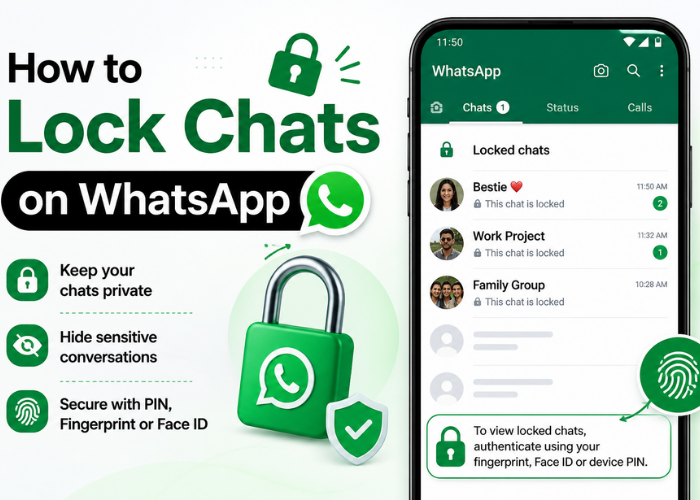
Privacy has become paramount in today’s digital world. Since messaging apps are now a big part of the way we communicate on a day-to-day basis, it’s important to lay down security rules for personal conversations. If you frequently share your phone with your friends, family, and colleagues, then you may want to worry about someone peeking in on your personal Conversations. And this is where learning how to lock your chats on WhatsApp can be really helpful.
WhatsApp now has features that help you lock certain chats with additional protection. Be it sensitive data, personal discussions, or even work-related confabs, locking chats makes sure that only you get to read them. This is easy to use but super effective and one of the hottest privacy tools on the platform.
This comprehensive guide will tell you all about locking chats on WhatsApp – from stepwise instructions, benefits, limitations, to pro tips for optimizing your security.
Lock Chats on WhatsApp: An overview
Now, before going into how to lock chats on WhatsApp, you should know what this feature is all about. Chat Lock: A privacy feature that lets you lock chats with your phone’s built-in biometric system, either fingerprint scanning, Face ID, or a simple alphanumeric code.
Lock chat: When you lock a specific chat, it goes to another folder that is separate from your main chat list. Alerts from locked chats are likewise minimized for a totally private experience. This means that even if someone gets hold of your phone, they will not be able to open those chats without authenticating themselves.
The Advantages of Lock Chats on WhatsApp
More than privacy, knowing how to lock chats on WhatsApp is about having control and peace of mind. Most users unfairly underestimate privacy while messaging until it is breached.
You store personal conversations, Financial talks, and perhaps some confidential work messages – chats are the best place to keep them protected. It prevents accidental usage by a child or buddy you casually hand your phone over to.
Key Benefits of Lock Chats on WhatsApp
- Improved Privacy: Hides sensitive conversations from prying eyes
- Second Layer of Security: fingerprint or passcode to open
- Notifications hidden: previews of messages are hidden
- The Locked chats are kept separately in Organized Chats
- Nice to know: I can share my phone without panic
How to Lock Chats on WhatsApp (Step-by-Step Guide)
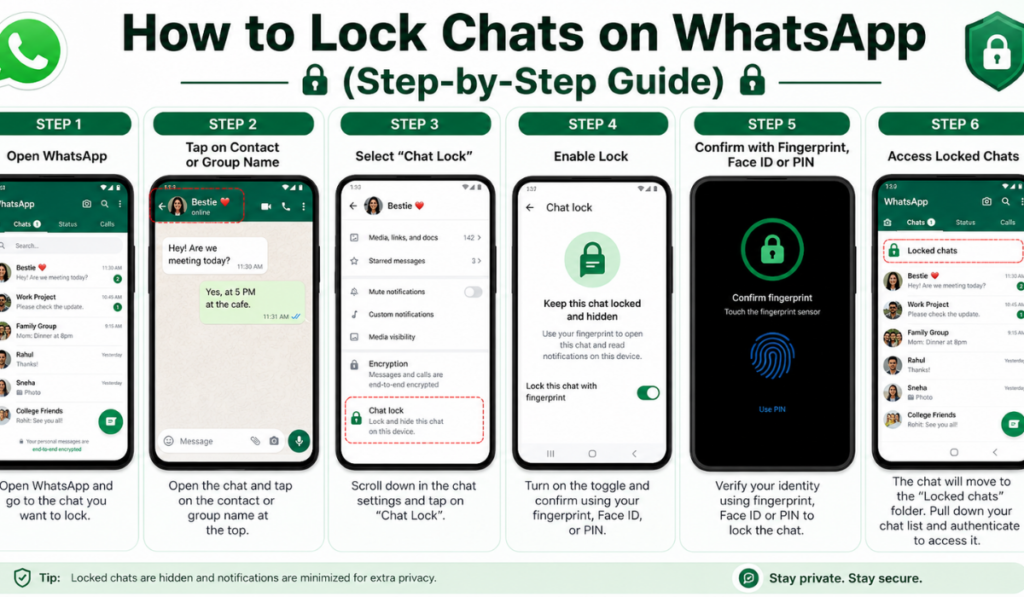
This brings us to the most important part – how do you lock chats on WhatsApp? The method is easy; you can do this on Android and iPhone, of course.
Step 1: Open WhatsApp
Open WhatsApp on your Android phone and tap the chat you wish to lock.
Step 2: Tap on Contact Name
Go to the chat and tap on the contact or group name at the top to open settings for chatting.
Step 3: Select “Chat Lock”
To do that, scroll down to the Chat Lock section. Tap on it to proceed.
Step 4: Enable Lock
Toggle Chat lock and now confirm either by your fingerprint, Face ID, or passing through the passcode.
Step 5: Access Locked Chats
After you lock a chat, it will be transferred to the “Locked Chats” folder. To access it, you have to pull down your chat list and verify.
Read more: WhatsApp Update Download | GB WhatsApp APK Download | Jar Mod Com
Unlocking Chats On WhatsApp
Now, once you have learned how to lock WhatsApp chats, there will also be times when you need to unlock them.
Steps to Unlock
- Open the locked chats folder
- Choose the chat that you want to unlock
- Tap on the contact name
- Turn off the chat lock option
- Confirm using your authentication method
If you unlock a chat, it returns to your normal chats list.
Show Hide Chat Lock Option On WhatsApp
There are some users who also search for new ways, such as how to hide the Lock Chats on WhatsApp option for better privacy. Follow the trick to completely hide this feature; WhatsApp does not allow hiding it completely.
Do not share your phone (this will keep your locked chats hidden), use an app lock for added security. Naming patterns can be avoided, and reducing locked chats with their elimination makes such chats not noticeable.
Features of Lock Chats on WhatsApp
The first step in learning how to Lock Chats on WhatsApp is knowing that the most powerful features come with it. Such features are created to provide maximum functionality with minimum complications to the user.
Main Features
- Chat Hidden In an Encrypted Folder
- The content of messages cannot be seen in notifications
- Requires biometric authentication
- This works for one-on-ones and group chats
- Easy to enable and disable
Unlocking a Locked Chat on WhatsApp Android
Follow this method if you use an Android device to learn how to unlock a Lock Chats on WhatsApp Android. It is easy and user-friendly.
Open WhatsApp and go to the bottom of the “Locked Chats” folder. Once you tap on it, authenticate yourself using your fingerprint or PIN. Now, in the chat, once inside, tap on the contact name and turn off the chat lock option to remove it permanently.
This method works well on most modern Android phones and is fast and secure.
Read more: Hawa Mahal Ticket Price | Techyhittools org | GB WhatsApp APK Download
Advice to make better use of Chat Lock
It is not enough only to lock chats on WhatsApp, but you can use it cleverly too.
So here are the expert secrets to get the most out of your privacy:
- Crowd through important chats, and lock them up
- Use strong phone security (PIN, fingerprint, Face ID)
- Avoid sharing your unlock credentials
- Daily look for updates in locked chats
- Chat Lock + App Lock: Additional Security Content
Lock Chats on WhatsApp – Pros and Cons
Like any other feature, you can go on with the understanding of what it means to lock chats on WhatsApp, the benefits, and the limitations as well. Although it helps a lot with privacy, you should know how each piece works in real-world scenarios.
Pros
Strong privacy protection:
Lock chats provide a layer of security in addition to your phone lock screen. And if someone breaks into your device, they only get in front of the last passcode entry attempt – your private conversations are still off limits without a biometric measure or passcode. This is particularly useful for securing private, fiscal, or classified job communications.
Easy to use and manage:
Perhaps the best thing about learning how to lock chats on WhatsApp is how uncomplicated the feature itself is. No tech knowledge required – it just takes a few taps to encrypt your chat. The management of locked chats is also simple, as you can lock or unlock them anytime without any hassle.
Prevents unauthorized access:
This feature makes it impossible for anyone to access the chats you’ve chosen without your authorization. Locked chats remain completely out of reach unless you authenticate, be it a nosy friend, coworker, or leggy child using your cell.
Keeps sensitive chats hidden:
Locked chats are taken from the main chat list to a separate folder so that they are less distracting. It makes us more discreet since people will not easily spot your private talks when they are looking through your phone.
Works seamlessly with phone security:
For those of you who missed the announcement, WhatsApp is locked based on your existing device security – fingerprint or Face ID. So that means not having to remember yet another password, and the experience is not compromised in terms of being quick and seamless.
Cons
Requires device authentication every time:
Security is definitely a plus, but it can feel like an inconvenience at times. You must authenticate your identity every time you open a locked chat, which may be a hindrance if these conversations open often.
No support for super old WhatsApp versions:
An older app will see no chat lock. For users with older devices or who don’t update their apps regularly, this becomes frustrating.
Locked chats also show up as a folder
The Locked Chats folder appears straightforward, even if the chats hiding behind it are concealed. While they will not be able to gain access to those, this means that someone may still know you are hiding conversations.
Backup Security is dependent on the settings you follow
Unfortunately, your locked chats can still be recreated from a backup if your WhatsApp backups (Google Drive or iCloud) are not encrypted. Ultimately, the level of security available to you is reliant on your backup settings.
Common Mistakes to Avoid Lock Chats on WhatsApp
Some people unknowingly make some mistakes in learning to lock chats on WhatsApp, due to which they do not get the full benefit of this feature. However, it is still important not to make these mistakes so that your privacy and security can be protected.
Not updating to the latest version of WhatsApp
The majority of users never go back to their app, so they miss all the security features available. An old version might not provide the chat lock feature, or it could have bugs that deteriorate its ability.
Using weak phone passwords:
But if the phone has a weak password, everything is compromised, even when your chats are locked. This is for when someone else can just unlock your device and try to open whatever chats you have that are locked. Tip – Use a strong PIN, pattern, or biometric security always.
Neglecting to lock very sensitive chats:
Occasionally, these users only lock some chats, making them easy for hackers to duplicate PINs on locked chats. You need to review the chats on a regular basis and lock a conversation that needs protection.
While sharing your phone without locking crucial conversations:
Get your phone, but more importantly, the sensitive chat you did not secure. Anyone not locking their phone lets someone read private messages in only seconds.
Ignoring backup security settings:
Most limit only attentiveness to chat lock and neglect backup immunity. Your data will still be exposed if your backups are not encrypted. Make sure end-to-end encryption auto backup is always turned on.
Chat Lock: a program that improves digital privacy.
With such a growing need for digital privacy, finding ways to lock chats on WhatsApp is just a step in the right direction. With this feature, even if someone can unlock your device, he wont be able to view your private conversations.
This is also useful in professional scenarios where sensitive or confidential information can be shared via messaging applications. Locking chats creates a safe communication space to protect personal and professional data.
FAQs – Lock Chats on WhatsApp
Are we capable of locking anyone in WhatsApp?
The lock should also let you lock multiple chats one by one in the chatting app.
How long until chat lock is disabled?
Yes, the chats that were locked are hidden in a different folder, and verifying it with authentication.
Can I lock group chats?
Yes, the feature works for individuals as well as group chats.
What happens to notifications of locked conversations?
Message content is hidden in notifications.
Chat lock is only available on Android devices and has not yet rolled out to iOS devices.
The feature is available on redesigned WhatsApp releases for Android and iPhone.
Conclusion
Email WhatsApp Tech news Learning to lock chats on WhatsApp is one of the most intelligent steps. You easily lock down your most critical conversations so no one can snoop. It is user-friendly and a very efficient way to keep it confidential.
From personal messages to work discussions, chat lock allows you to keep everything in your hands. This, combined with solid device security and proper use, will give you a secure messaging solution.
In today’s world, privacy is paramount, and little things such as locking your chats can go a long way. This is the right time to start using this feature and keep your convos really private, if you haven’t done it yet.







![How to Logout from WhatsApp Complete Step-by-Step Guide [2025]](https://wedwasapp.com/wp-content/uploads/2025/01/How-to-Logout-from-WhatsApp-Complete-Step-by-Step-Guide-2025.jpg)